CLOUD
10-Mar-201814-Dec-2023
Start/Stop Control
Interspace Cloud provides a straightforward and efficient way to manage your cloud servers' operational status. To gain access to these functionalities begin by logging into the My Interspace control panel. Once in, navigate to the service linked to your server and select the Start/Stop Console tab. This area provides tools for controlling the power state of your server, including viewing its current operational status. 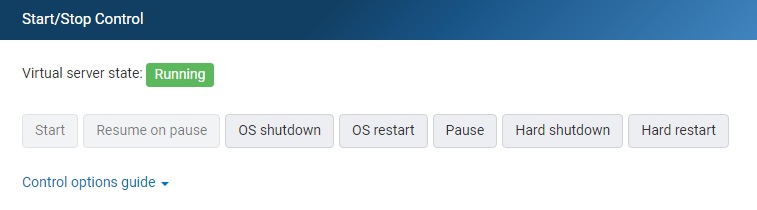 The available actions are detailed below:
- OS shutdown. Performs an operating system-assisted shutdown. This is the recommended shutdown action (although it takes more time) because the operating system ensures that all pending I/O operations are gracefully ended before commencing a shutdown.
- OS restart. Performs an OS assisted shutdown and then powers on the server. This is the recommended restart action (although it takes more time) because the operating system ensures that all pending I/O operations are gracefully ended before commencing a shutdown.
- Hard shutdown. Performs a hard shutdown similar to pressing the device's power off button. The system does not shutdown in an orderly manner, skipping file system synchronization and other activities that would occur on an orderly shutdown by the operating system.
- Hard restart. Performs a hard reset similar to pressing the device's reset button. The system does not reboot in an orderly manner, skipping file system synchronization and other activities that would occur on an orderly restart by the operating system.
Previous: Add/Remove Private IP Addresses
Related content
Documentation

Cloud

Communications

Hosting

My Interspace
Tech Articles

Tutorials

Learn
News

Latest news

Latest events
Related products

Elastic Cloud VPS
Elastic Cloud VPS is a virtual machine running on advanced cloud and networking technologies, offering superior advantages over traditional VPS hosting at an exceptional price-to-performance ratio.
Deploy OS and apps in just 1 min. One-click geo-redundant backups, snapshots and disaster recovery. Next-generation AMD EPYC processors, ultra-fast NVMe storage, dedicated connections and free private networking.

Load Balancer
The Load Balancer distributes traffic to multiple servers in your private network, ensuring high performance and redundancy. Designed for high availability and large numbers of connections.
It offers advanced features, including free automatic SSL certificates, automatic failover, session persistence, connection multiplexing, WebSocket, per-IP rate limiting and more.

Cloud NАТ Gateway
Allows your cloud servers with only private IP addresses to get outbound and inbound connections over the Internet, and routes traffic between servers on different private subnets.
Cloud servers reach the Internet through the NAT gateway, and can also receive inbound connections using port forwarding.

Cloud VPN
Cloud VPN creates a secure virtual private network that enables encrypted communication between LAN networks at physical sites, individual computers/smartphones and virtual servers in Interspace Cloud.
It is perfectly suited for banks, software developers, CRM/ERP service providers, healthcare organizations, legal firms, accounting firms, e-commerce businesses and globally dispersed teams.
 English
 Deutsch
 Македонски
 Shqip
Shqip Slovenščina
 Srpski
 Български