MY INTERSPACE
25-Feb-2026
Invoices and Add-on Charge Calculation
The My Interspace control panel gives you instant access to all invoices generated for your account. If any of your services include add-ons, you can also view the detailed specification for the calculation of add-on charges for each invoice. Follow the steps below to access these documents.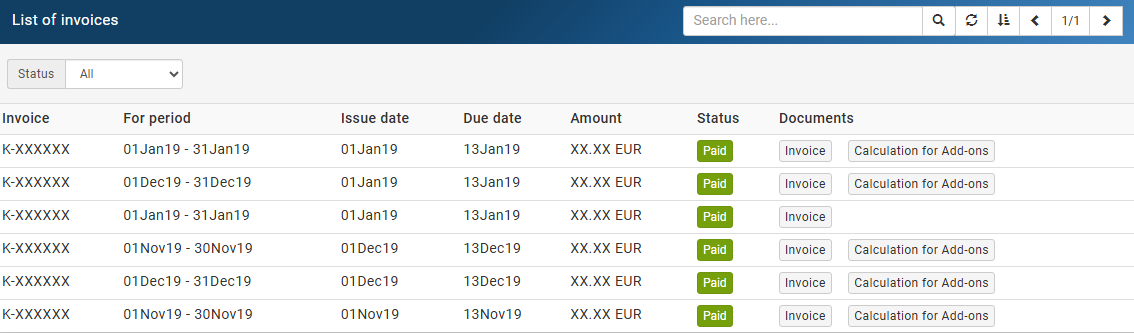
1.View and Download Your Invoices
Log into your My Interspace control panel account and click the profile icon in the upper right corner. From the dropdown menu, select Invoices. This will display a table listing all invoices associated with your account. Each row shows the invoice number, the billing period it covers, the issue date, the due date, the total amount, and the current payment status.To view and download an invoice, click the Invoice button in the Documents column of the corresponding row.Paid invoices are clearly marked with a green Paid status indicator, making it easy to track your payment history at a glance. You can use the Status filter to narrow the list to invoices with a particular payment status.2.Detailed Specification for Calculation of Add-on Charges
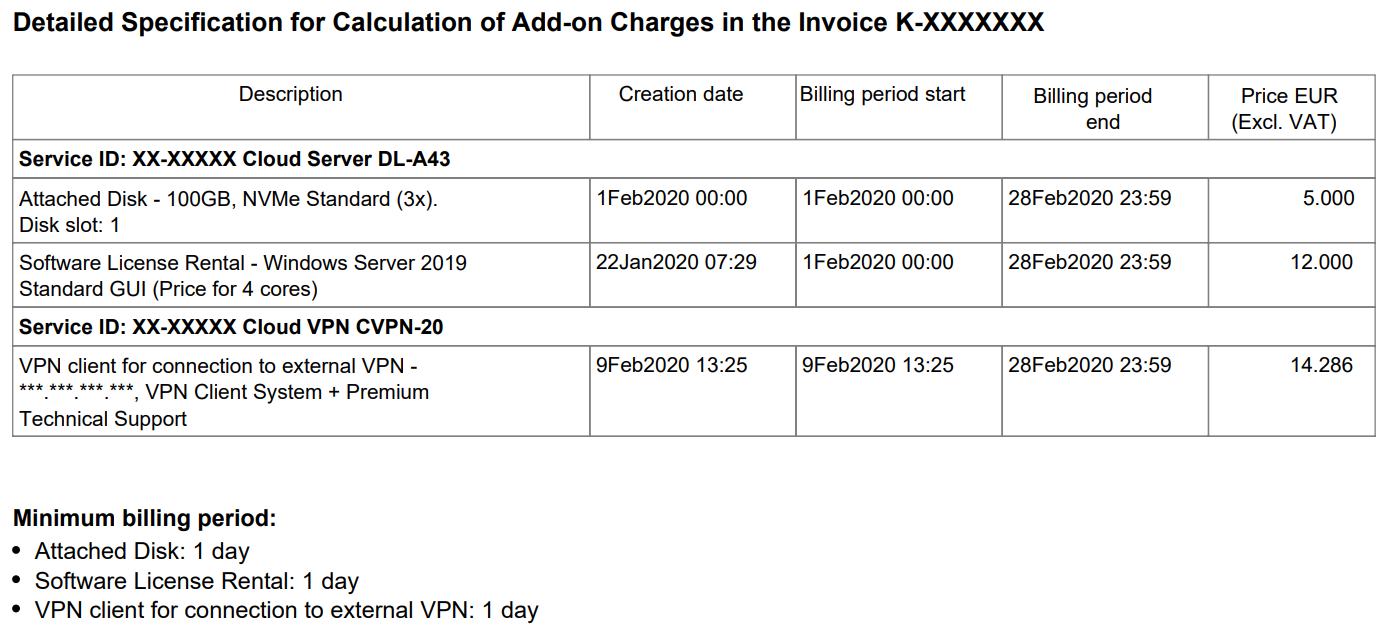
For invoices that include add-ons, such as paid software licenses, attached disks or other add-ons, a Calculation for Add-ons button will appear alongside the Invoice button in the Documents column. Clicking this button opens a detailed specification explaining exactly how each add-on charge was calculated.For each add-on, the specification lists the associated service ID and service name, the exact date and time the add-on was provisioned, the billing period start and end dates and the price .For example, a software license add-on such as a Windows Server license will appear as a separate line item showing the service it is attached to, the license edition (for instance, the number of CPU cores the license covers), the provisioning timestamp, and the charge for that billing cycle.Next: Requesting Support
Previous: Changing the Plan of the Service
Related content
Documentation

Cloud

Communications

Hosting

My Interspace
Tech Articles

Tutorials

Learn
News

Latest news

Latest events
Related products

Premium Internet Access
Highest-grade Internet access for professional needs. Superior point-to-point fiber-optic link, symmetrical down/up speed, unlimited traffic, SLA 99.9% and static IP. Direct connections to the top tier 1 global providers.
Our network architecture is passionately designed to ensure the highest quality connections to any destination worldwide, boasting unmatched transfer speeds and multi-tier redundancy.

Dedicated Servers
Dedicated servers on high-grade hardware from well-known sever vendors. They are hosted in our own data centers, enabling us full control in safe-guarding the uptime 24/7. Selection of primary data centers and a disaster recovery one located at a safe distance.
Power control options (reset, power off/on) and free of charge KVM-over-IP available 24/7 on a single click, including support to remotely boot/install your own ISO images.

Elastic Cloud VPS
Elastic Cloud VPS is a virtual machine running on advanced cloud and networking technologies, offering superior advantages over traditional VPS hosting at an exceptional price-to-performance ratio.
Deploy OS and apps in just 1 min. One-click geo-redundant backups, snapshots and disaster recovery. Next-generation AMD EPYC processors, ultra-fast NVMe storage, dedicated connections and free private networking.

Cloud VPN
Cloud VPN creates a secure virtual private network that enables encrypted communication between LAN networks at physical sites, individual computers/smartphones and virtual servers in Interspace Cloud.
It is perfectly suited for banks, software developers, CRM/ERP service providers, healthcare organizations, legal firms, accounting firms, e-commerce businesses and globally dispersed teams.
 English
 Deutsch
 Македонски
 Shqip
Shqip Slovenščina
 Srpski
 Български