CLOUD
28-Feb-201828-Feb-2023
Requesting Support
For prompt assistance with our services, we encourage you to submit a support ticket via the My Interspace control panel. This process helps our team quickly locate the related systems and efficiently address your issue.Simply log into My Interspace, select the relevant service, and click the Support tab. There, you can create a ticket, detailing your issue and selecting the priority. 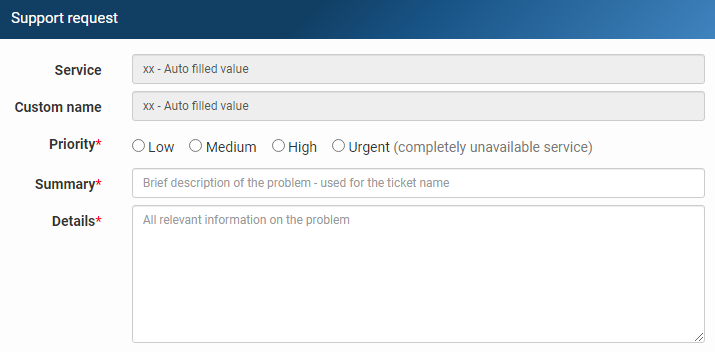 Our website, knowledge base and control panel are available in multiple languages. However, we communicate with our customers in English only. This allows us to coordinate quickly across our teams and deliver the best possible support.For more detailed information on how to request support, including alternative contact methods like telephone or email, please refer to our detailed guide for requesting support.
Related content
Documentation

Cloud

Communications

Hosting

My Interspace
Tech Articles

Tutorials

Learn
News

Latest news

Latest events
Related products

Cloud Web Hosting
Shared web hosting on cloud infrastructure, supported by enterprise-grade systems for a professional web presence. Automatic backups and disaster recovery replication for all accounts.
Server architecture designed for business-critical applications. Next-generation AMD EPYC processors, ultra-fast NVMe storage, ECC reg memory and dedicated Internet connection.

Elastic Cloud VPS
Elastic Cloud VPS is a virtual machine running on advanced cloud and networking technologies, offering superior advantages over traditional VPS hosting at an exceptional price-to-performance ratio.
Deploy OS and apps in just 1 min. One-click geo-redundant backups, snapshots and disaster recovery. Next-generation AMD EPYC processors, ultra-fast NVMe storage, dedicated connections and free private networking.

Load Balancer
The Load Balancer distributes traffic to multiple servers in your private network, ensuring high performance and redundancy. Designed for high availability and large numbers of connections.
It offers advanced features, including free automatic SSL certificates, automatic failover, session persistence, connection multiplexing, WebSocket, per-IP rate limiting and more.

Cloud NАТ Gateway
Inbound and outbound connections over the Internet, for your virtual servers that have only private IP addresses.
The servers access the Internet by routing the traffic through the NAT gateway. Optionally, they can receive inbound connections from the Internet using the port forwarding feature.

Cloud VPN
Cloud VPN creates a secure virtual private network that enables encrypted communication between LAN networks at physical sites, individual computers/smartphones and virtual servers in Interspace Cloud.
It is perfectly suited for banks, software developers, CRM/ERP service providers, healthcare organizations, legal firms, accounting firms, e-commerce businesses and globally dispersed teams.
 English
 Deutsch
 Македонски
 Shqip
Shqip Slovenščina
 Srpski
 Български